If you’ve been putting off building a website because you’re not sure what it’s going to cost you — this guide is for you. on how much does it cost to build a WordPress website.
The honest answer? It depends. A simple blog can go live for under $100 a year. A full-fledged eCommerce store with custom features? You’re looking at a few thousand. The tricky part is that most people either overspend on things they don’t need yet, or underspend and hit a wall six months later when their site can’t handle what they need it to do.
I’ve broken this down as clearly as possible — no fluff, no hidden fees buried in footnotes. Just a realistic picture of what you’ll spend at each stage.
- First, What Does “Building a WordPress Website” Actually Involve?
- Option 1: Low-Budget WordPress Website ($46 – $100/year)
- Option 2: Small Business Website ($300 – $1,000/year)
- Option 3: WordPress eCommerce Website ($1,000 – $3,000+/year)
- Option 4: Custom WordPress Website ($5,000 – $15,000+)
- Hidden Costs Most People Don’t Account For
- How to Spend Less Without Sacrificing Quality
- Quick Cost Summary
- Final Thoughts
- Frequently Asked Questions
First, What Does “Building a WordPress Website” Actually Involve?
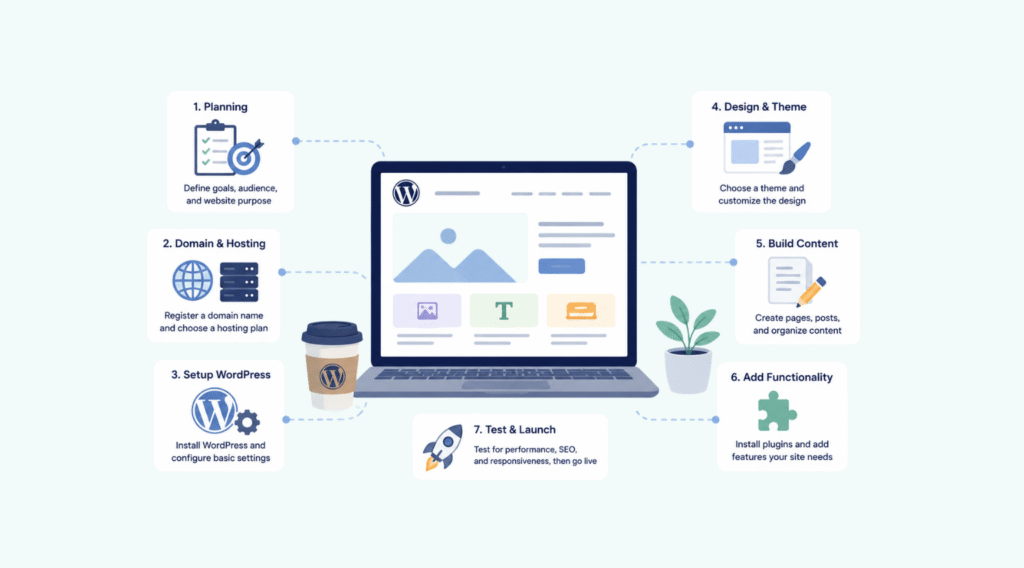
WordPress itself is free. That part is true. But running a live website that real people can visit requires a few things you do have to pay for.
Here’s the short version of what goes into a functioning WordPress site:
Web Hosting — This is the server where your website lives. No hosting, no website. Prices range from around $3/month on shared hosting to $30+/month for managed WordPress hosting.
Domain Name — Your web address (example: yoursite.com). Usually costs $10–$20 per year. Many hosts throw in the first year free.
A Theme — Controls how your site looks. There are thousands of free ones. Premium themes typically run $40–$100 as a one-time purchase, sometimes with an annual renewal for support.
Plugins — These are like apps for your WordPress site. They add features — contact forms, SEO tools, security, backups, you name it. Many are free. Some of the better ones cost anywhere from $50 to $200+ per year.
That’s the full picture. Now let’s look at what you’d realistically spend depending on what kind of site you’re building.
Option 1: Low-Budget WordPress Website ($46 – $100/year)
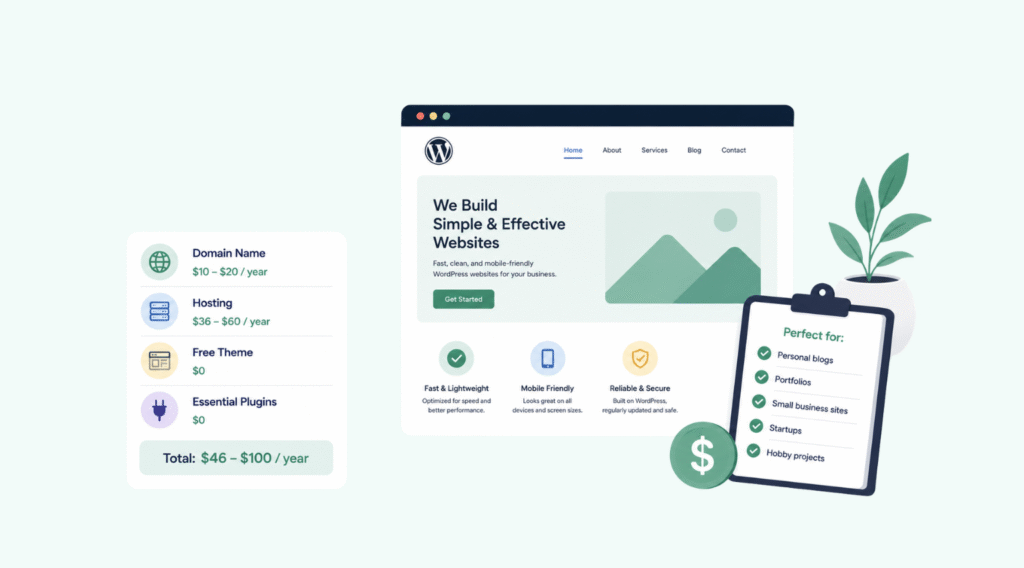
This is the entry point. Totally doable, and honestly, it’s the right starting point for most people who are just getting started — bloggers, freelancers, hobbyists, or anyone who wants an online presence without a big upfront commitment.
What you’re working with:
At this budget, you’re looking at affordable shared hosting (Bluehost’s basic plan often runs around $2.95–$3.95/month with promotional pricing), a free domain for the first year, a free theme from the WordPress.org directory, and free plugins covering the basics.
What you can realistically build:
A clean, functional website with a homepage, about page, contact page, and a blog. You can add a contact form, connect Google Analytics, and even do basic SEO — all without spending a rupee beyond hosting.
The trade-offs:
Free themes are fine, but most of them are limited when it comes to customization. You also won’t have priority support from your host, and backups may not be automatic. These aren’t dealbreakers when you’re starting out, but they’re worth knowing.
Recommended free plugins for this budget:
- WPForms Lite (contact forms)
- All in One SEO free version (search optimization)
- WP Super Cache (site speed)
- Duplicator free (backups)
- Sucuri free scanner (basic security)
This setup is more than enough to get started. Many websites that started here have grown into six-figure businesses — the platform doesn’t limit you, the budget does.
Option 2: Small Business Website ($300 – $1,000/year)
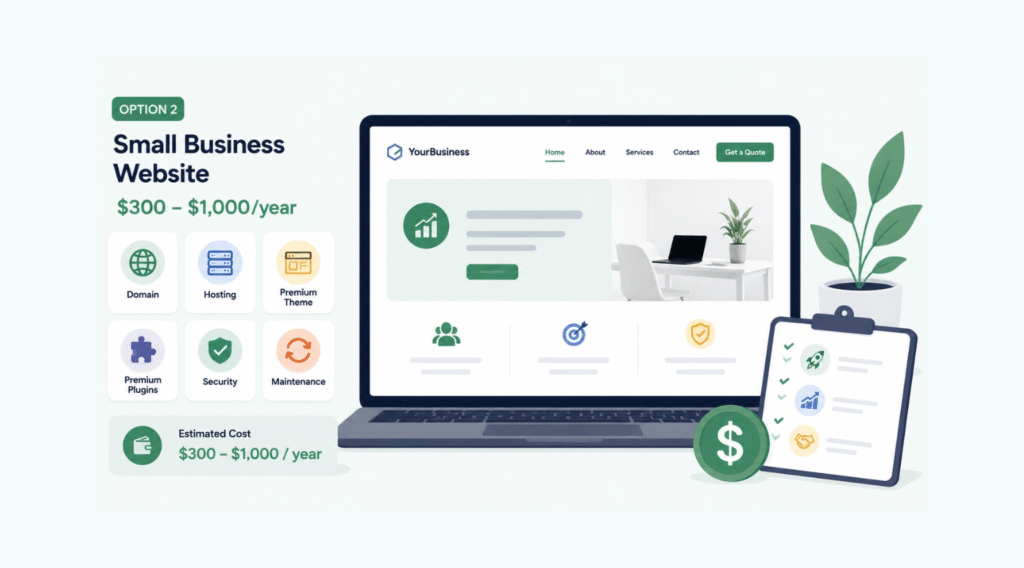
Once you’re serious about using your website to generate leads, build credibility, or support a real business — this is the range you’re looking at.
The biggest shift here is moving from free tools to premium ones. And the difference is noticeable. Premium plugins are more reliable, better supported, and packed with features that actually move the needle for a business.
Typical cost breakdown:
| Item | Estimated Annual Cost |
|---|---|
| Managed or mid-tier hosting (e.g., SiteGround GrowBig) | $120 – $200 |
| Premium theme | $50 – $100 |
| WPForms Pro (lead capture forms) | ~$99 |
| All in One SEO Pro | ~$99 |
| WP Mail SMTP Pro (email deliverability) | ~$49 |
| Security & backups (Sucuri or Duplicator Pro) | $60 – $100 |
| Email marketing tool (e.g., Constant Contact) | $100 – $200 |
What changes at this level:
You get a faster, more reliable hosting environment. Your forms actually work the way you need them to — with conditional logic, payment fields, CRM integrations. Your emails land in inboxes instead of spam folders. Your site gets automatic backups. And your SEO setup is proper, not just surface-level.
If you’re running a service business — a law firm, dental practice, marketing agency, contractor, real estate agent — this is the budget range that makes your website actually do something for you.
One thing many small business owners miss: don’t cheap out on hosting. A slow website loses visitors. Shared hosting is fine when you’re just starting out, but once you’re driving traffic through ads, local SEO, or social media — speed matters. A lot.
Option 3: WordPress eCommerce Website ($1,000 – $3,000+/year)

Running an online store is a different beast. You’re dealing with product pages, inventory, payment gateways, shipping options, taxes, customer accounts, and a whole layer of security requirements that a standard business website doesn’t need.
The core stack for a WooCommerce store:
WooCommerce itself is free — but the extensions and services you need to run a real store are not. Here’s a realistic cost picture:
| Item | Estimated Annual Cost |
|---|---|
| WooCommerce-optimized hosting | $200 – $400 |
| SSL certificate (often included with hosting) | $0 – $70 |
| WooCommerce-compatible premium theme | $50 – $100 |
| Payment gateway fees (Stripe, PayPal, etc.) | 2–3% per transaction |
| WooCommerce extensions (shipping, subscriptions, etc.) | $100 – $500 |
| Email marketing with eCommerce automation | $150 – $300 |
| Security + backup solution | $100 – $200 |
| SEO plugin (AIOSEO or similar) | ~$99 |
| Cart abandonment / conversion tools (e.g., OptinMonster) | ~$99 |
A few things worth noting:
SSL is non-negotiable for an eCommerce site. If your host doesn’t include it free, get it. Google flags non-HTTPS sites, and customers won’t trust a store without it.
Payment processing fees are ongoing — 2.9% + $0.30 per transaction on Stripe, for example. Factor that into your margins from day one.
WooCommerce has a massive extension library. Some of the most useful ones (like subscriptions, bookings, memberships) are premium. Budget for the ones you actually need rather than buying everything upfront.
The upside: once your store is set up properly, WordPress + WooCommerce gives you more control than Shopify at a significantly lower ongoing cost — especially as your revenue scales.
Option 4: Custom WordPress Website ($5,000 – $15,000+)

This is when you’re hiring someone to build a site from scratch — custom design, custom functionality, nothing off the shelf.
Custom development costs are driven by a few factors:
Custom theme design: A designer creating a unique visual identity for your site, built specifically for your brand. Expect $2,000–$5,000 for this alone.
Custom development: If you need features that no plugin handles — custom booking systems, membership tiers, complex databases, API integrations — you’re hiring a developer. Rates for experienced WordPress developers typically run $50–$150/hour in the US, lower with offshore teams.
Project management and communication time: Often underestimated. A full custom build takes weeks of back-and-forth. Factor in your own time too.
Realistic budget ranges:
- Simple custom design + standard features: $5,000 – $8,000
- Mid-complexity custom site: $8,000 – $12,000
- Complex custom functionality: $12,000 – $25,000+
A smarter alternative for many businesses:
Before going the full custom route, consider using a drag-and-drop builder like SeedProd or Elementor. These tools have gotten genuinely good, and many agencies now use them to deliver custom-looking results at a fraction of the cost. You’d be surprised how far a skilled designer can take you with these tools — without writing a single line of code.
Hidden Costs Most People Don’t Account For

Beyond the standard setup, here are some costs that catch website owners off guard:
Domain renewal: The first year is often discounted. Year two? Full price — usually $15–$20 for a .com.
Hosting renewal: Introductory pricing expires. That $3/month plan often renews at $8–$12/month. Read the fine print before you commit.
Premium plugin renewals: Most premium plugins are annual subscriptions. That $99 you paid last year? It’s due again.
Website maintenance: If you’re not doing it yourself, professional WordPress maintenance plans typically run $50–$200/month. This covers updates, security checks, uptime monitoring, and support.
Content creation: Photography, copywriting, video — none of that is included in the “website cost” but all of it determines whether your website actually converts visitors into customers.
How to Spend Less Without Sacrificing Quality

A few practical ways to keep costs down:
Start with what you need, not what you want. A five-page website with solid SEO and a good contact form will outperform a bloated 30-page site with six plugins you don’t use.
Bundle tools where possible. Some hosting providers include SSL, CDN, email, and backups in one plan. Compare what’s included before buying things separately.
Use coupon codes. Almost every major WordPress tool offers promotional pricing — especially around Black Friday. WPBeginner, IsItWP, and Kinsta’s blog regularly post verified discount codes.
Don’t hire a developer for things you can do yourself. Tutorial libraries like WPBeginner’s have step-by-step guides for almost every common task. You’d be surprised what you can handle with an afternoon and some patience.
Audit your plugins yearly. It’s easy to accumulate subscriptions you no longer actively use. An annual review keeps your costs lean and your site running clean.
Quick Cost Summary
| Website Type | Annual Cost Range |
|---|---|
| Personal blog / low-budget site | $46 – $100 |
| Small business website | $300 – $1,000 |
| eCommerce / WooCommerce store | $1,000 – $3,000+ |
| Custom-built website | $5,000 – $15,000+ |
Final Thoughts
Building a WordPress website doesn’t have to be expensive — but going in without a budget plan almost always leads to overspending on the wrong things or underspending on the stuff that actually matters.

The best approach, regardless of your budget, is to figure out what your website actually needs to do — generate leads, sell products, book appointments, build an audience — and then build the simplest version of that. Add complexity only when you’ve outgrown what you have.
Start lean. Get live. Iterate as you grow. That’s the approach that works.
If you’re still unsure which setup is right for your situation, drop your questions in the comments below — happy to help you figure out where to start.
Frequently Asked Questions
WordPress software itself is free, but you need to pay for hosting and a domain name to make your site live on the internet.
Get shared hosting (Bluehost or Hostinger), use a free theme from WordPress.org, and stick to free plugins. You can get online for under $50 in the first year.
Not at all. WordPress is beginner-friendly and thousands of free tutorials are available. You only need a developer for complex custom features or unique design requirements.
Shared hosting starts at $2–$4/month. Mid-tier managed hosting runs $10–$30/month. High-performance managed WordPress hosting can go $30–$100+/month depending on traffic needs.
For a business website, yes. Premium themes offer better design, regular updates, dedicated support, and more customization options than most free themes.
A basic WooCommerce store can cost $500–$1,000 upfront and $1,000–$3,000 annually when you factor in hosting, SSL, premium extensions, and marketing tools.
Hosting is a recurring cost — monthly or annual. Domain name renews yearly. Premium plugins and themes usually have annual subscription fees for updates and support.
Yes. You can migrate from Wix, Squarespace, Shopify, or WordPress.com to a self-hosted WordPress.org site. Some hosts offer free migration assistance.
If you manage it yourself, maintenance is mostly free — just your time. Professional maintenance services typically charge $50–$200/month covering updates, backups, and security monitoring.
Generally yes, especially long-term. Wix and Shopify have fixed monthly fees that add up quickly as you scale. WordPress gives you more control over costs and no platform transaction fees with WooCommerce.
Read our blogs:
The Ultimate Guide to SEO in 2026
What is Generative Engine Optimization (GEO)?
TablePress WordPress Plugin Vulnerability (Affects 700,000+ Sites)
What CMOs Must Know About Their WordPress Stack
4 SEO Tracking Tools to Dominate Search Results
Inside Google’s Algorithm: A Googler’s Deposition Exposes Ranking Factors & SEO Secrets